Account & settings
Subscription & invoices
For once this isn't about your clients' money, but your own: the subscription you have with TrainerFoundry. You'll find it under Administration → Billing, and your own invoices right next to it under Administration → Invoices & receipts.
Not to be confused with the invoices to clients: those are the invoices you issue to your clients through your Stripe account. This page is about the invoices TrainerFoundry issues to you.
The trial
Every new account starts with a 14-day trial. Nothing beyond your plan's own limits is restricted during that time: you add clients, sell offers, take money — a Starter trial is still capped at 25 active clients from day one, same as after the trial ends. You've already provided a payment method at sign-up; it's only charged once the 14 days are up.
While the trial runs, a blue banner sits above every page showing the days remaining — not an ad, just the countdown, so the end doesn't catch you off guard. If you don't want to continue, cancel before it runs out in the customer portal (see below); then nothing is ever charged.
Plans
There are two selectable plans, and both include every feature — scheduling, payments, CRM, the client portal, the lead pipeline, QR campaigns, follow-up automation, risk analysis and financial reporting. The only difference is capacity: Starter covers you up to 25 active clients and 500 emails a month. Professional has no client limit and 5,000 emails a month — one flat price whether you look after 15 clients or 150. There's currently no third plan for teams with several coaches.
Both are available monthly or yearly; paying yearly gets you two months free. Current prices are on the pricing page. Every price is a total: exactly the list price is charged, marked incl. VAT when it contains VAT, otherwise no VAT.
If you hit the 25-active-client limit on Starter, TrainerFoundry declines the next new client — and the next lead-to-client conversion — with a friendly notice and a button that takes you to the Billing page, where you can open Stripe's portal and switch to Professional. Nothing is lost along the way: clients set to Inactive or Lead don't count towards the limit, and existing active clients above the cap — say, from before this plan applied — stay untouched.
The "Billing" page
A deliberately compact page: the Subscription card, the usage bar for your emails and a button that takes you to Stripe's customer portal.
If your business is in an EU country other than Germany and you're still on the trial, you'll also see a banner here reading "Enter your VAT ID and billing address so the first invoice can be issued correctly (B2B reverse charge instead of VAT)", with an Enter now shortcut into Tax & Billing. In Germany you won't see it: your TrainerFoundry invoice always includes German VAT, with or without a VAT ID. Outside the EU — including Australia — you won't see it either: a VAT ID never validates there, the reverse-charge mechanism is EU-only, so TrainerFoundry doesn't show a nag you could never satisfy.
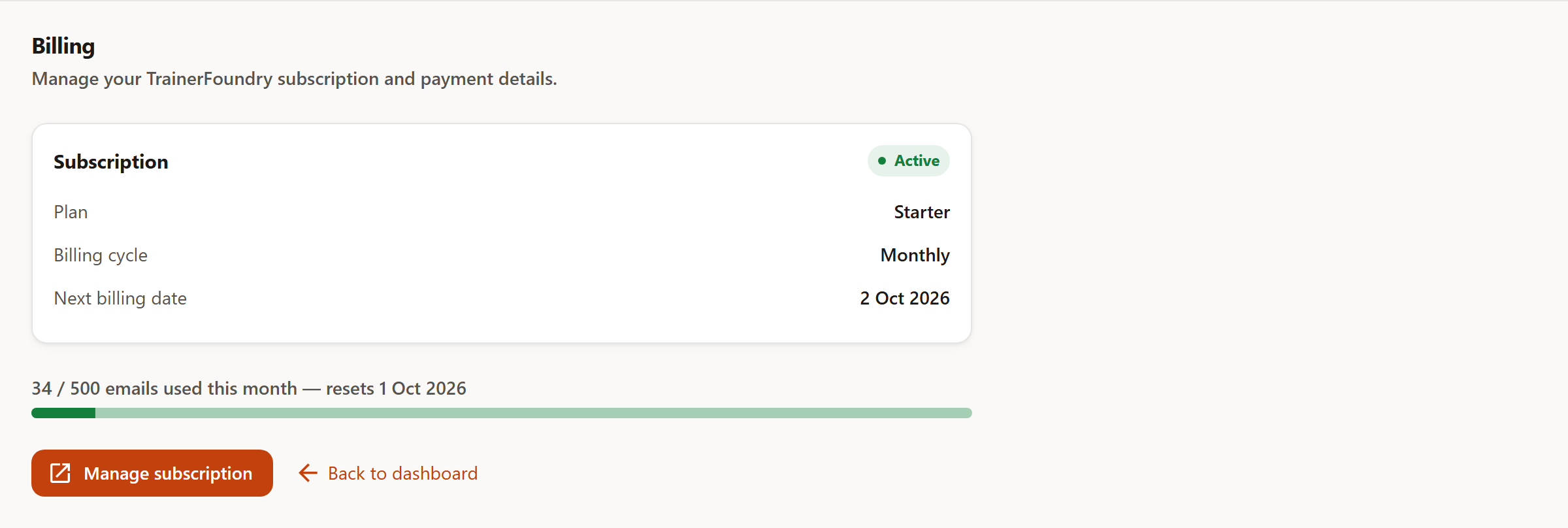
The card names your plan and the date of your next billing — during the trial the same line reads "First charge on", with the remaining trial days above it. Directly under the plan sits the billing cycle — Monthly or Yearly, whichever you chose. For a very old subscription TrainerFoundry doesn't yet have a stored value for, this row stays hidden until Stripe's next update.
Top right shows the state of your subscription:
- Trialing — The first 14 days — nothing is charged yet; your plan's own limits (like Starter's active-client cap) apply as normal.
- Active — Everything paid, everything open. The normal case.
- Past due — A charge attempt failed. You can keep working — but not forever.
- Canceled — The subscription has ended. Your data stays; editing is locked.
- Unpaid — Paused after several failed charge attempts. Like Canceled: read-only.
- Incomplete — The first payment was never completed. Also locked.
When a payment fails
The most important section on this page, because it describes what you can still do if it comes to that.
If a charge fails — an expired card, a limit exceeded — the subscription moves to Past due. That's a grace period: an orange banner appears above every page, but you keep working normally. Creating sessions, recording payments, all as usual. Stripe retries the charge several times during this window.
If it stays that way, the subscription lands on Unpaid or Canceled — and TrainerFoundry switches to read-only. You can still view everything: clients, sessions, payments, reports already generated and their files. Nothing can be changed anymore; save buttons are greyed out, and a notice offers to manage the subscription. Generating a new report or export also counts as a change and is blocked — downloading what already exists still works. So no data is lost and nothing is deleted; you just can't enter anything new until payment goes through again. The moment it does, everything is open again immediately.
Stripe's customer portal
Manage subscription opens Stripe's customer portal. Everything about the subscription itself happens there, not in TrainerFoundry: changing plan, updating payment method and cancelling. That's deliberate — your card details are never meant to pass through our servers at all. Your billing address lives on the TrainerFoundry side instead — see Your invoices below.
A cancellation in the portal takes effect at the end of the paid period, not immediately. Until then, a notice on the billing page shows the date access ends, and nothing changes before that day. As long as you only switch between plans, everything stays open anyway.
Which language the portal appears in isn't decided by your browser, but by your own interface language — the one you set via the language switcher in the header.
The email quota
Every plan has a monthly quota of emails that TrainerFoundry sends on your behalf: 500 on Starter, 5,000 on Professional. Everything that actually leaves the building counts — invitations to the Client App, payment requests, invoices, reminders, broadcasts.
The bar on the billing page shows where you stand and changes colour as you go: green below 70%, amber from 70%, red once you're over 90%. Next to it is the date the counter resets to zero — always the first of the month, German time. It's a number the typical account never looks at twice; if you regularly send broadcasts to a large client list, it's worth keeping an eye on.
Once the quota is used up, the action involved is refused and a message appears naming the plan, the limit and the day it resets — with a button that takes you to the Billing page, where you can open Stripe's portal and switch to Professional. The action itself — say, a payment request — isn't sent in that case; waiting until the start of the month or switching plan are the two ways through.
Your invoices
Under Administration → Invoices & receipts sit the invoices TrainerFoundry has issued you via Stripe Billing — exactly the receipts you need for your own bookkeeping.
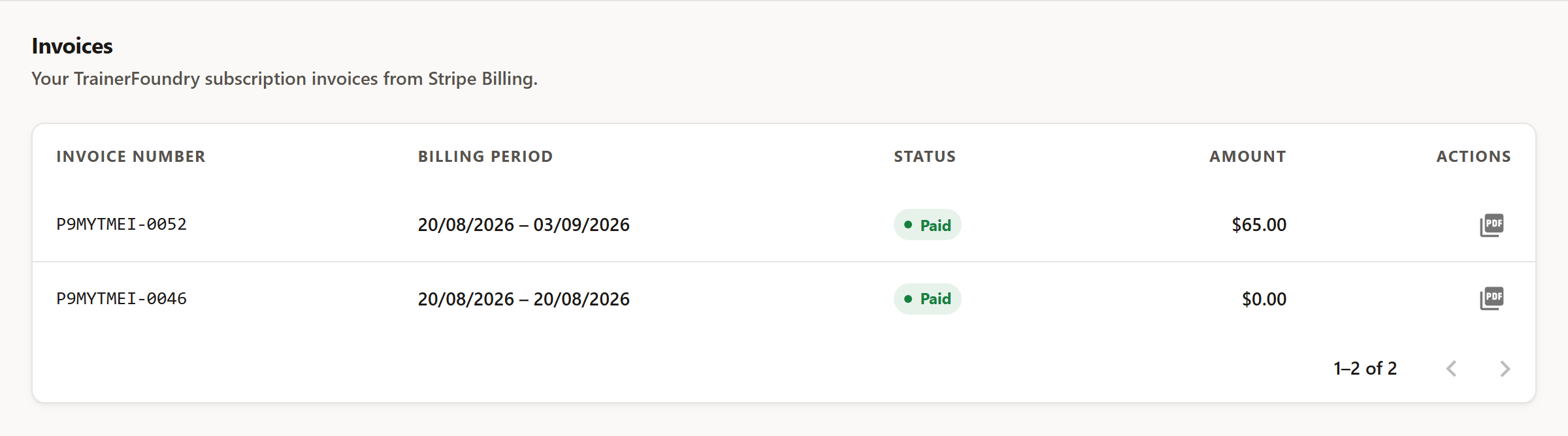
Every row names the invoice number, the billing period, the status and the amount. Status can be:
- Paid — Charged and completed.
- Open — Issued, but not yet paid.
- Draft — Prepared by Stripe, not yet issued.
- Void — Withdrawn — nothing will be collected.
- Uncollectible — Written off as no longer collectible.
The PDF icon on the right downloads the receipt. An invoice for $0.00 right at the start is normal, by the way: Stripe issues it when the trial begins, so the subscription has a clean starting point. The PDF is written in your own interface language — the one you set via the language switcher in the header.
That very first $0.00 invoice is issued the moment your trial starts, before you've had a chance to enter anything under Tax & Billing — so it never carries your legal name. Every invoice after it does, once you've saved your correct legal or business name and billing address — and, if you're in the EU, a validated VAT ID, which triggers the reverse charge mentioned above when you're based outside Germany — under Settings → Tax & Billing. An Australian ABN doesn't reach any of these invoices: TrainerFoundry's own tax registration is Germany-only, so there's no reverse-charge equivalent for a non-EU tax number here.